Pet Cameras Without a Subscription: What You Actually Give Up
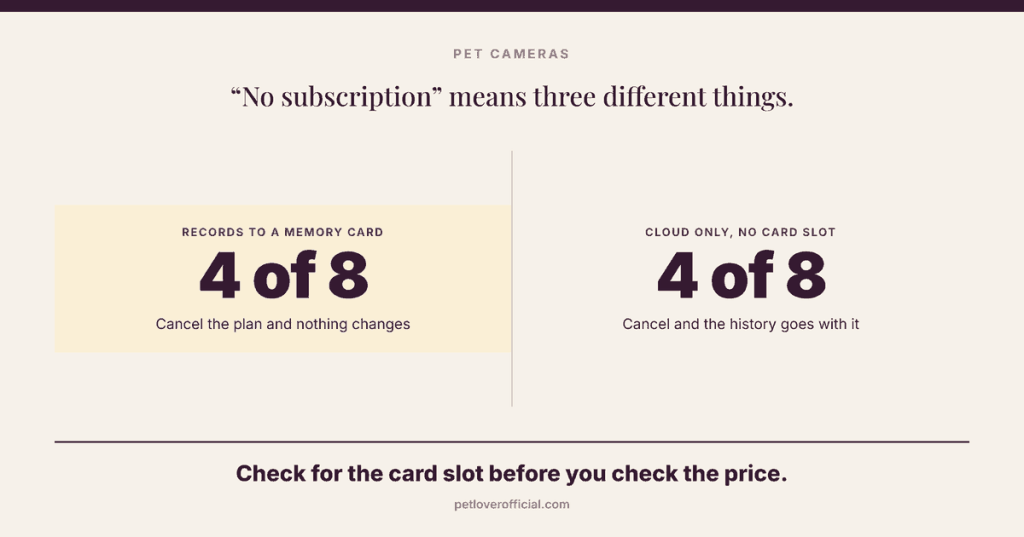
“No subscription” is printed on a lot of pet camera boxes, and it means three different things. Some cameras record to a card in the base and owe nobody anything. Some have a free tier that works, but only as a demonstration of the paid one. And one model will not switch on at all until you have paid.
Three things “no subscription” can mean
Our full comparison of eight pet cameras found that the monthly fee usually decides more than the hardware does. This page is the follow-up for people who would rather not pay one at all. The first thing to sort out is what the phrase is actually promising.
1. The card is the product
You put a microSD card in the camera and it records to it. Detection runs on the device, notifications still arrive, and there is no cloud account holding your footage hostage. eufy, Tapo and Nooie all work this way. A plan exists, but it buys you an off-site copy rather than the feature itself.
2. The free tier is a demonstration
The camera works without paying, but the free version is shaped to make you feel the limit. Wyze’s free cloud tier is the clearest example. Ring’s is the bluntest: live view and alerts work, and nothing is ever saved.
3. There is no card slot at all
Furbo and Petcube are cloud-only. Live view, two-way audio and the treat toss keep working unpaid, but video history is the subscription — there is no local fallback to drop back to, because there is nowhere local to record.
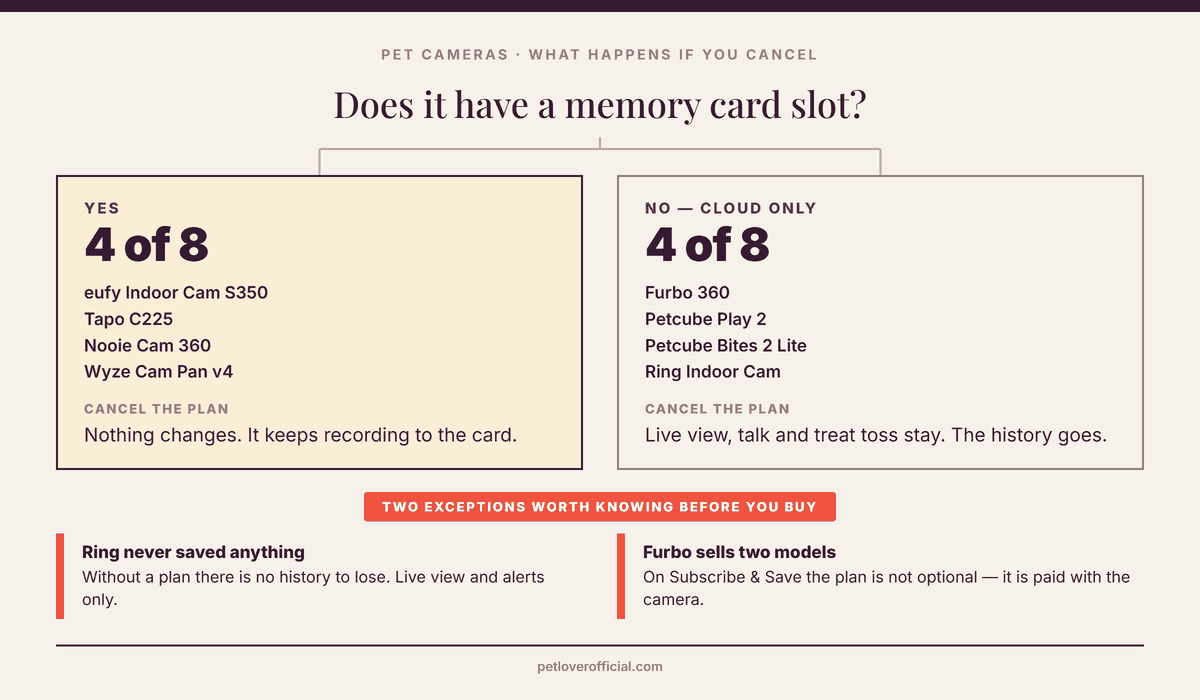
The question to ask before you buy is not “does it need a plan”. It is “what stops working the month I stop paying”. For a camera with a card slot the answer is usually nothing. For a cloud-only camera the answer is the part most owners bought it for.
What each camera does unpaid
| Camera | Local storage | What still works with no plan | What the plan adds | Plan price |
|---|---|---|---|---|
| eufy Indoor Cam S350 No fee, no catch | microSD up to 128GB | Recording, on-device detection, notifications | Nothing you need | None required |
| Tapo C225 | microSD up to 512GB | Recording, motion and pet detection, live view | Tapo Care adds a cloud copy | TP-Link does not publish a fixed price |
| Nooie Cam 360 | microSD up to 128GB | Recording, motion tracking, live view | Optional cloud history | Optional |
| Wyze Cam Pan v4 | microSD up to 512GB | 24/7 card recording, live view, basic alerts | Cam Plus: 14-day cloud history, pet detection | $2.99/mo per camera |
| Petcube Play 2 | None | Live view, two-way audio, laser | Petcube Care: 3 or 90 day history, smart alerts | Optimal or Premium tier |
| Petcube Bites 2 Lite | None | Live view, two-way audio, treat toss | Same as above | Optimal or Premium tier |
| Furbo 360 Standalone model | None | Live view, talk, treat toss, barking alerts | Furbo Nanny: video history, smart alerts | Optional on this model |
| Ring Indoor Cam | None | Live view, motion alerts, two-way talk — but nothing is saved | Recorded video you can go back and watch | Ring Home from $4.99/mo |
What Wyze’s free plan actually gives you
Wyze is the camera most often recommended as the no-subscription option, and it half-earns that reputation. Its own product page says the Cam Pan v4 will “record 24/7 locally with a microSD card up to 512 GB”, with Cam Plus offered as an optional extra on top. Put a card in and it records, with no account and no fee. That part is real.
The free cloud tier is a different thing. It is widely reported to cap each event clip at 12 seconds and then ignore motion for a five-minute cooldown, which is long enough to miss the rest of whatever your dog is doing. Wyze does not state either limit on its Cam Plus page, so we are flagging those two numbers as reported rather than confirmed — they come from secondary coverage, not from Wyze.
What Wyze does publish is the price and what the plan adds: Cam Plus is $2.99/mo per camera and brings cloud recordings kept for 14 days plus person, pet, vehicle and package detection. If you run three or more cameras, Cam Unlimited covers all of them at $9.99/month or $99/year.
For one pet camera in one room, the card is enough. Cam Plus earns its price when you have several cameras and want the pet-versus-person filtering to cut down notifications — not because the camera stops recording without it.
Furbo sells two different cameras under one name
This is the trap on this page. Furbo sells the 360 two ways, and only one of them works unpaid.
On the Standalone model — the one you buy outright at full price — Furbo’s own help center is unambiguous: “The fundamental features of Furbo will ALWAYS remain free for the Standalone model: barking/meowing alerts, treat-tossing, and camera live-view.” Buy it that way and you can ignore Furbo Nanny forever, at the cost of having no video history at all.
The Subscribe & Save model is the cheap one you see advertised, and it is a different arrangement. Furbo states that “the subscription fee will be charged together with the Furbo upfront payment”, and that you can “cancel anytime 5 days before auto renewal”. The low hardware price is the plan, paid up front.
A gap we could not close: Furbo publishes its Subscribe & Save prices as images rather than text, so we have not reproduced the figures here. Its own page also warns that “price may change based on alterations to promotional offers”. Read the total on the checkout screen, not the headline. Our Furbo 360 review works through what the plan unlocks and what the two-year cost comes to.
Petcube without Care
Both Petcube cameras here work out of the box. Live view, two-way audio and the interaction you bought them for — the laser on the Play 2, the treat toss on the Bites 2 Lite — are not gated behind the plan.
Petcube Care comes in two tiers, Optimal and Premium, and its own support page describes what they add as extended cloud history of 3 or 90 days, longer 30-second clips, downloads, smart alerts and a two-year warranty.
One point we are not confident about. The same support page lists “24/7 video recording, 30 second video clips, and the 2-year device warranty” as things that work without Care, while also listing 30-second clips among the paid benefits. Those two statements sit badly together and Petcube does not resolve them. If clip length is the reason you are choosing Petcube, ask their support in writing before you buy.
The one that isn’t a pet cameraRing is a security camera you are pointing at a dog
Ring without a plan is not dead. Live view, real-time motion alerts, two-way talk and custom motion zones all work, and Ring calls that “a complete real-time security experience”. What the camera will not do is keep anything.
Ring’s own description of what the subscription adds is the giveaway: the ability to “review what happened while you were away”. For a doorbell, where the alert is the product, that split is reasonable. For a pet camera, reviewing what happened while you were away is the product. Ring Home starts at $4.99 a month.
Buy Ring if you already run Ring elsewhere in the house and want everything in one app. Do not buy it as your way of avoiding a subscription.
PracticalWhat a memory card actually buys you
What you get
- Recording that keeps working when your internet drops
- No account holding your footage, and nothing to cancel
- Full-resolution video rather than a compressed cloud copy
- A one-time cost of roughly two months of most plans
What you don’t
- Cards loop — the oldest footage is overwritten, so a clip you want is gone if you do not save it
- If the camera is stolen or destroyed, the recording goes with it
- Cards wear out; continuous recording is hard on them
- The card is almost never in the box
eufy’s own FAQ gives the practical shape of it. On a 128GB card, “when continuously recording at the highest resolution, it can record up to 120 hours (5 days) of footage” before it starts overwriting. Drop the resolution, or record only on motion, and that stretches a long way.
QuestionsBefore you buy
Which pet camera has genuinely no monthly fee?
The eufy Indoor Cam S350 is the cleanest answer: it records to a microSD card, runs its detection on the device, and eufy sells it on “local storage, no monthly fee”. The Tapo C225 and Nooie Cam 360 work the same way at lower prices and lower picture quality.
Can I use a Furbo without paying?
On the Standalone model, yes — Furbo says live view, talking, treat toss and barking alerts stay free permanently. On the Subscribe & Save model, no: the plan is bundled into the purchase. The two look identical in photographs, so check which one is in your cart.
Does a treat-tossing camera need a plan to toss treats?
No. On both Furbo and Petcube the toss is a hardware function driven from the live view, and both companies list it among the unpaid features. What you lose without a plan is the recording of the moment, not the moment itself.
Is a cloud plan worth it for separation anxiety?
This is the one case where it can be. Watching live tells you your dog is barking; history tells you it started forty minutes after you left and stopped on its own, which is the thing a vet or a trainer can use. A card does this too, as long as you remember to export the clip before it loops.
Why do prices here not match what I see?
Because several of these companies do not publish a stable number. TP-Link’s own FAQ says Tapo Care pricing “varies by region and promotional offers” and sends you to the app to see yours. Furbo says much the same about its bundles. We have quoted only the figures a manufacturer publishes as text, and said so where they do not.
Buy the card slot
If avoiding a monthly fee is the goal, the decision is made at the hardware stage and not in the app: buy a camera with a microSD slot, put a card in it, and the question never comes up again. Among the eight we compared, the eufy Indoor Cam S350 does this best, and the Tapo C225 does it cheapest.
Buy cloud-only — Furbo, Petcube — if the thing you actually want is the treat toss or the barking alert, and accept that history is a paid extra on top. Just make sure you know which Furbo you are buying.
See all eight cameras compared →Related guides
The Best Pet Cameras of 2026
Eight cameras on what you can do through them, whether they know a bark from a passing truck, how much of the room they see, and the monthly cost after you buy.
Furbo Dog Camera Review
How the treat toss compares with its rivals, what the plan unlocks, and why the cost lands differently by year three.
The Best GPS Dog Collars
The other pet device with a monthly fee attached. Real battery life in live mode, and the 12-month total most round-ups leave out.
The Best Automatic Litter Boxes
Four self-cleaning boxes on how much work they really remove, multi-cat use, and the app fees nobody mentions.
Daisuke
Daisuke writes about pet technology and pet insurance for petloverofficial.com. He builds each comparison from manufacturers’ own specification and help pages rather than their marketing pages, and says plainly when a company does not publish a number.

